Chapter 1b - Turtle
Turtle
We first need to import turtle so we can start using turtle functions
import turtle
What is Turtle? 🐢
a pre-installed Python library that enables users to create pictures and shapes by providing them with a virtual canvas
This activity used Trinket turtle / canvas graphics. Piston runs text programs only, so the interactive drawing pad is gone.
Run turtle locally in Python (or Thonny / Mu) with the snippets above. Text I/O practice elsewhere on this page still uses Piston.
What is a library? 📚
In python libraries are a collection of modules, containing code that can be used in different programs.
Analogy: Suppose you have a set of questions about Biology, I don't know much about biology, so Ideally I would like to invite (import) a biology teacher to our class so you can ask him biology questions.
#The biology teacher library probably doesn't exist, but this is just to show how this would it would translate in code
import biology_teacher
# We invite our biology teacher to the room

biology_teacher.askBiologyQuestion("Can I turn my cat into diamond?")
# and now we are asking our biology teacher a biology related question
Why is it useful? Is useful to have libraries as a way to get access to precreated code that can help us accelerate our programming (so we can focus on creating what we want instead of the details of something)
Mini quiz — libraries
Libraries
1 / 2What does this do?
import turtle
Pick an answer to see if you are right.
Drawing a circle
import turtle

turtle.circle (100) # draws a circle with radius 100

🧪 Try the code out!
This activity used Trinket turtle / canvas graphics. Piston runs text programs only, so the interactive drawing pad is gone.
Run turtle locally in Python (or Thonny / Mu) with the snippets above. Text I/O practice elsewhere on this page still uses Piston.
Moving to Coordinates 🗺
We can out the pen down when we are ready to draw
import turtle

turtle.goto(20, 20)
turtle.goto(-30, 50)

# turtle.home() #goes to (0,0)

What are coordinates?

🧪 Try the code out!
This activity used Trinket turtle / canvas graphics. Piston runs text programs only, so the interactive drawing pad is gone.
Run turtle locally in Python (or Thonny / Mu) with the snippets above. Text I/O practice elsewhere on this page still uses Piston.
import turtle

turtle.circle (50, 180) # draws a semi-circle (first parameter is radius, second is degrees)

🧪 Try the code out!
This activity used Trinket turtle / canvas graphics. Piston runs text programs only, so the interactive drawing pad is gone.
Run turtle locally in Python (or Thonny / Mu) with the snippets above. Text I/O practice elsewhere on this page still uses Piston.
🙋♂️ What do you think we would need to do in order to draw a quarter-circle with 40 of radio?
import turtle
turtle.circle (50, 360/4) # or 90
🧪 Try the code out!
This activity used Trinket turtle / canvas graphics. Piston runs text programs only, so the interactive drawing pad is gone.
Run turtle locally in Python (or Thonny / Mu) with the snippets above. Text I/O practice elsewhere on this page still uses Piston.
Turtle Shape 🐢 ⚪ ⬛
We can change how the pen looks like
turtle.shape('arrow')

turtle.shape('turtle')

turtle.shape('circle')

turtle.shape('square')

turtle.shape('triangle')

turtle.shape('classic')
🧪 Try the code out!
This activity used Trinket turtle / canvas graphics. Piston runs text programs only, so the interactive drawing pad is gone.
Run turtle locally in Python (or Thonny / Mu) with the snippets above. Text I/O practice elsewhere on this page still uses Piston.
Picking the Pen up and down ✒
turtle.penup()
turtle.circle (40, 360/4)
turtle.pendown()
turtle.circle (40, 360/4)

🧪 Try the code out!
This activity used Trinket turtle / canvas graphics. Piston runs text programs only, so the interactive drawing pad is gone.
Run turtle locally in Python (or Thonny / Mu) with the snippets above. Text I/O practice elsewhere on this page still uses Piston.
Mini quiz — pen and color
Pen and color
1 / 2What does this do?
turtle.penup()
Pick an answer to see if you are right.
Colors
turtle.color("yellow") # is used to set the colour of the drawn line
turtle.fillcolor("yellow") # is used to set the color that should be used to fill the drawn figure
🧪 Try the code out!
This activity used Trinket turtle / canvas graphics. Piston runs text programs only, so the interactive drawing pad is gone.
Run turtle locally in Python (or Thonny / Mu) with the snippets above. Text I/O practice elsewhere on this page still uses Piston.
Speed 🏃♂️
turtle.speed(5) # speed varies from 0 to 10
turtle.speed(0) # 10 is the fastest, and speed increases from 1 to 10
🧪 Try the code out!
This activity used Trinket turtle / canvas graphics. Piston runs text programs only, so the interactive drawing pad is gone.
Run turtle locally in Python (or Thonny / Mu) with the snippets above. Text I/O practice elsewhere on this page still uses Piston.
Width
You can change the width using something like:
turtle.width(5)
Example:
import turtle
turtle.goto(20, 20)
turtle.width(5)
turtle.goto(-30, 50)

Hiding and Showing Turtle
turtle.hideturtle() # Hides the turtle
turtle.showturtle() # Shows the turtle
Challange Time ✨: Turtle Assigment
- This is the graphic that needs to be created:
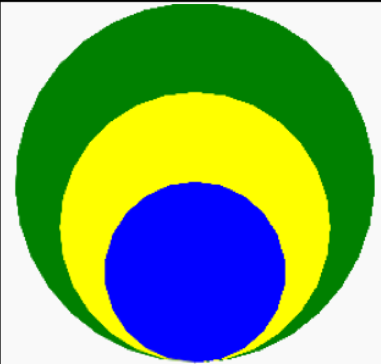
- Before creating the graphic, think about how you will create it. Break down the graphics - How many shapes are there? What are their colors? What are their sizes? Is the turtle visible in the graphic? How should the Python lines of code be sequenced in order to get this image?
- Write down the instructions needed to create this graphic in the editor (local Python / Thonny).
- After completion, share a screenshot or your local turtle file(https://forms.gle/Xcznm1uY195zkN3H9).